.png&w=96&q=75)
.png&w=96&q=75)
![[object Object]](/_next/image?url=https%3A%2F%2Fsolveit.dev%2Frails%2Factive_storage%2Fblobs%2FeyJfcmFpbHMiOnsibWVzc2FnZSI6IkJBaHBBcUlNIiwiZXhwIjpudWxsLCJwdXIiOiJibG9iX2lkIn19--ed0fd151e20d53623a5ebd5cdafd18d2aa7edf08%2Fcover%2520(47).png&w=2048&q=75)
Key takeaway: Successful healthcare apps do not win because they have the longest feature list. They win because they remove friction from real healthcare workflows – booking care, managing medication, accessing records, tracking health, supporting caregivers, or staying engaged between visits.
Healthcare is becoming more digital because patients now expect care to be easier to access, manage, and coordinate.
They want to book appointments without waiting on the phone. They want to see test results without calling the clinic. They want medication reminders, secure communication, virtual consultations, personalized health insights, and a simpler way to stay connected with their care providers.
In this article, we’ll look at 8 successful healthcare apps, their core features, and what businesses can learn from them when building healthcare applications. We’ll also cover the features modern users expect from healthcare apps and the key things businesses should consider before investing in healthcare app development.
Healthcare apps market in numbers
Healthcare apps are no longer a niche category. Health & Fitness apps accumulated approximately 1.83 billion downloads in 2025, showing how strongly users already rely on mobile products to track, manage, and improve their health.
The broader digital health market is also crowded. IQVIA reports that there are around 337,000 digital health apps commercially available, which means businesses are not only entering a growing market – they are entering a competitive one.
The business opportunity keeps expanding as well. The healthcare mobile application market was valued at $115.3 billion in 2025 and is expected to reach $463.9 billion by 2032, growing at a 22.0% CAGR.
But these numbers also show how competitive the market has become. For a new healthcare app, growth depends not only on development quality, but also on product strategy, user trust, UX, and how well the app fits into real patient or provider workflows.
What makes a healthcare app successful?
A successful healthcare app solves a real healthcare problem in a way that feels simple for the user.
That sounds obvious, but many healthcare applications fail because they start with features instead of workflows. The team decides to add appointment booking, chat, reminders, analytics, AI, or wearable integrations before clearly understanding who will use the product, what problem they need to solve, and how the app should fit into their daily routine.
In healthcare, this matters more than in many other industries.
A patient may use the app while feeling anxious about symptoms. A caregiver may be coordinating tasks with several family members. A doctor may have only a few minutes between appointments. A clinic administrator may need accurate data, permissions, and reporting. If the app adds more complexity instead of reducing it, users will not keep using it.
The strongest healthcare apps usually share several qualities.
-
They are easy to understand from the first session. Users should not need training to book an appointment, check a care plan, join a video consultation, or set a medication reminder.
-
They build trust. Healthcare apps for patients often deal with personal, sensitive, or emotional topics. Clear language, transparent data handling, secure access, and responsible guidance are essential.
-
They support engagement without becoming annoying. Notifications, reminders, and progress updates should help users take action, not overwhelm them.
-
They fit into healthcare workflows. A patient-facing healthcare mobile app may look simple on the outside, but behind it there may be provider dashboards, admin panels, EHR or EMR integrations, billing logic, role-based permissions, analytics, and compliance requirements.
-
They solve one important problem. Many successful mobile healthcare apps started by focusing on a clear use case: virtual visits, medication adherence, cycle tracking, mental health support, sleep insights, or care coordination.
In other words, healthcare app success is not about building “more.” It is about making one important healthcare interaction easier, safer, and more useful.
Build healthcare app users can trust and adopt - start with SolveIt
Contact usTypes of healthcare apps
Healthcare apps can serve patients, providers, caregivers, clinics, hospitals, insurers, wellness brands, or healthcare operations teams. Some products focus on one user group, while others connect several roles in one platform.
.png&w=2048&q=75)
Here are the most common types of apps for healthcare.
✅ Patient portal apps
Patient portals give users access to medical records, lab results, appointment scheduling, provider messaging, prescriptions, bills, and care instructions. These apps are often connected to healthcare organizations and help patients manage their relationship with a clinic, hospital, or care network.
Need a patient portal app for your healthcare product? Explore our dedicated page!
Contact us✅ Telemedicine apps
Telemedicine apps allow patients to speak with healthcare providers remotely through video, chat, or phone consultations. They usually include scheduling, intake forms, provider matching, secure messaging, payment, prescriptions, and follow-up care.
✅ Medication management apps
Medication management apps help users remember when to take medication, track doses, manage refills, and sometimes share updates with caregivers or providers. These healthcare apps can be especially useful for chronic condition management and older patients. They're also a strong fit for conditions like ADHD, where staying consistent with doses is part of the challenge, many patients now combine these reminders with telehealth care such as MEDvidi's online ADHD medication services.
✅ Mental health apps
Mental health apps such as psychology practice management software may include meditation, therapy access, coaching, mood tracking, CBT-based exercises, breathing tools, sleep support, or mental wellness programs. In this category, trust, tone of voice, onboarding, and habit formation are especially important.
✅ Women’s health apps
Women’s health apps often support cycle tracking, fertility planning, pregnancy, symptom logging, perimenopause, and personalized educational content. These products depend heavily on personalization, privacy, and long-term engagement.
✅ Health tracking and monitoring apps
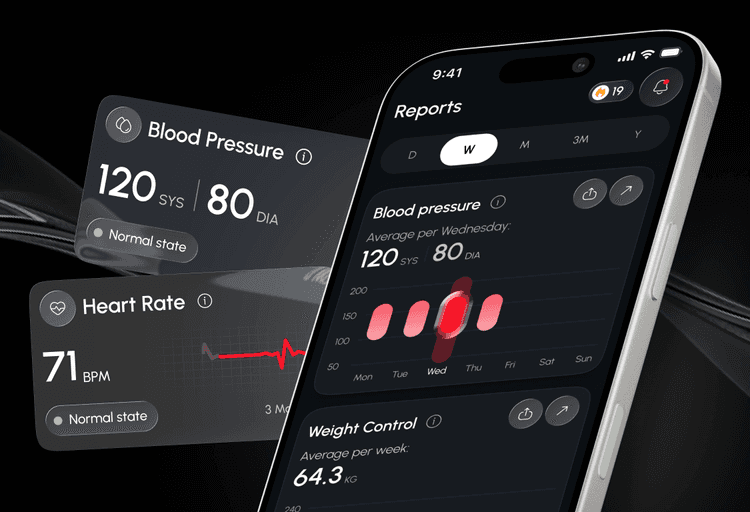
Health tracking and monitoring apps help users record and understand specific health indicators such as heart rate, symptoms, glucose levels, weight, or blood pressure. For example, a blood pressure monitor app should make it easy to add measurements, review changes over time, and understand personal health data without unnecessary complexity.
✅ AI-powered healthcare apps
AI-powered healthcare applications can support symptom assessment, triage, patient guidance, care navigation, personalization, documentation, and administrative automation. However, AI in healthcare should be positioned carefully. It should support users and healthcare professionals, not replace clinical judgment.
For companies planning to add these capabilities to a real product, AI solutions for healthcare can help validate the use case, design safe user flows, integrate data sources, and build production-ready AI features.
✅ Care coordination apps
Care coordination apps help caregivers, family members, and care teams stay aligned. They may include shared calendars, task lists, medication schedules, secure document storage, updates, notes, and role-based access.
✅ Wearable and connected health apps
Wearable and connected health apps help users track health data from smartphones, smartwatches, fitness rings, glucose monitors, sleep trackers, and other connected sources.
8 successful healthcare apps and what businesses can take from them
The best healthcare apps are not successful because they try to cover every possible use case. They usually win because they make one important healthcare workflow easier: booking care, managing medication, accessing records, tracking health, coordinating caregivers, or turning health data into practical insights.
Below are 8 successful healthcare apps and the business lessons companies can learn from them.
MyChart
🧩 Category: Patient portal
MyChart is one of the best-known examples of a patient portal app. It helps patients access appointments, test results, medications, billing details, provider messages, and other health information in one place.
Its value is simple: patients can manage routine healthcare tasks without calling the clinic every time.
📋 Key features:
-
Appointment access
-
Medical records
-
Test results
-
Secure messaging
-
Medication information
-
Billing and payments
💡What businesses can learn
Convenience drives adoption.
For healthcare apps for patients, even simple self-service features can create strong value. If users can book, check, pay, message, or access information faster, the app becomes part of their care routine.
Teladoc
🧩 Category: Telemedicine
Teladoc shows how mobile apps for healthcare can make care more accessible. The app connects users with healthcare professionals through virtual consultations, helping them get support without always visiting a physical location.
But the real product is not just video calling. It is the full care journey: onboarding, scheduling, intake, consultation, follow-up, prescriptions, and support.
📋 Key features:
-
Video and phone consultations
-
Virtual primary care
-
Mental health support
-
Chronic care support
-
Scheduling
-
Follow-up care
💡What businesses can learn
Reducing friction increases usage.
A telemedicine healthcare app should make it easy for users to move from “I need help” to “I know what to do next.” The fewer confusing steps, the better the experience.
Medisafe
🧩 Category: Medication management
Medisafe focuses on one clear problem: helping people take medication correctly and on time. It uses reminders, tracking, refill support, and medication schedules to help users stay consistent.
This is a good example of how simple healthcare applications can solve serious everyday problems.
📋 Key features:
-
Medication reminders
-
Dose tracking
-
Refill reminders
-
Medication schedules
-
Medication history
-
Caregiver sharing options
💡What businesses can learn
Simple features can solve major healthcare challenges.
Not every healthcare mobile app needs complex functionality from day one. A focused feature can become valuable when it solves a repeated and important user problem.
Have a healthcare app idea?
Let’s validate it together
Contact usAda Health
🧩 Category: AI healthcare
Ada Health is an AI-powered healthcare app that helps users assess symptoms and understand possible next steps. It does not replace a doctor, but supports users with structured health guidance.
This makes Ada a useful example for businesses thinking about AI in healthcare applications.
📋 Key features:
-
Symptom assessment
-
AI-supported questions
-
Health guidance
-
Possible condition information
-
Care navigation
-
24/7 access
💡What businesses can learn
AI should support healthcare decisions, not replace clinicians.
AI features should be used where they reduce confusion, save time, or guide users to the right next step. In healthcare, clear boundaries and responsible product design matter.
Flo
🧩 Category: Women’s health
Flo is a women’s health app focused on cycle tracking, fertility, pregnancy, symptoms, and personalized health insights. Its strength is long-term engagement: the product stays relevant as the user’s needs change over time.
For digital health apps, Flo is a strong example of personalization done around real user context.
📋 Key features:
-
Cycle tracking
-
Ovulation tracking
-
Pregnancy support
-
Symptom logging
-
Personalized insights
-
Educational content
💡What businesses can learn
Personalization improves app retention.
Users return when the product feels relevant to their current goals, stage, and needs. For healthcare apps, personalization should make the experience more helpful, not more complicated.
Headspace
🧩 Category: Mental health
Headspace makes mental health support feel simple and approachable. The app offers meditation, mindfulness, sleep support, stress management, and habit-building content.
Its main strength is improved UX. The product feels calm, guided, and easy to start, which is especially important in mental health.
📋 Key features:
-
Guided meditation
-
Mindfulness exercises
-
Sleep support
-
Stress management
-
Mental wellness content
-
Habit-building flows
💡What businesses can learn
Great healthcare UX often feels simple.
A healthcare app should not overwhelm users with too many options at once. The first session should make users feel supported, not confused.
Oura
🧩 Category: Connected health
Oura combines a wearable device with an app that tracks sleep, activity, readiness, recovery, and other health signals. The app turns raw data into scores and recommendations users can understand.
This is what makes Oura a useful reference for wearable and connected healthcare apps.
📋 Key features:
-
Sleep tracking
-
Activity tracking
-
Readiness insights
-
Recovery signals
-
Daily scores
-
Personalized recommendations
💡What businesses can learn
Users need actionable insights, not raw data.
Collecting health data is not enough. A successful healthcare app should explain what the data means and what users can do next.
Caring Village
🧩 Category: Care coordination
Caring Village helps families and caregivers coordinate care around a loved one. The app includes shared calendars, tasks, medications, documents, family updates, and AI-powered caregiving support.
Unlike many healthcare apps for patients, Caring Village is built around several user roles: care recipients, family members, caregivers, and care teams.
📋 Key features:
-
Shared care calendar
-
Medication tracking
-
Task management
-
Secure document storage
-
Family updates
-
AI caregiver support
💡What businesses can learn
Healthcare apps often succeed when they support real workflows and multiple user roles.
Care coordination is rarely handled by one person. Businesses building similar healthcare applications should map roles, permissions, responsibilities, and communication flows before development starts.
.png&w=2048&q=75)
Common features successful healthcare apps share
Successful healthcare apps can serve very different purposes, but they usually rely on the same product foundations: simple access, secure communication, useful reminders, clear data, and workflows that are easy to complete.
Here are the features many strong healthcare applications have in common.
Easy onboarding
Users should quickly understand what the app does and complete the first important action: book a visit, add medication, connect a provider, create a health profile, or start tracking progress.
Scheduling and appointment management
Many healthcare apps for patients include appointment booking, rescheduling, cancellations, reminders, and visit details. This reduces friction for users and manual work for healthcare teams.
Secure messaging
Secure communication helps patients, providers, caregivers, and support teams exchange updates, questions, care instructions, and follow-up information.
Notifications and reminders
Reminders can support medication adherence, appointments, daily check-ins, care tasks, and follow-up actions. The key is to make notifications helpful, not overwhelming.
Health records access
Patient portals and other healthcare mobile apps often give users access to lab results, visit summaries, prescriptions, care plans, and medical history.
Telemedicine functionality
For virtual care products, users need more than a video call. The full flow should include onboarding, intake forms, scheduling, consultation, prescriptions, and follow-up.
AI-powered features
AI can support symptom assessment, care navigation, personalization, documentation, and administrative automation. In healthcare, it should support decisions and workflows, not replace clinical judgment.
Dashboards and analytics
Providers, caregivers, and administrators often need dashboards to track patient activity, care tasks, adherence, engagement, or operational performance.
Wearable integrations
Connected healthcare apps can collect data from rings, watches, glucose monitors, blood pressure devices, or other wearables. The real value comes from turning data into clear insights. For consumer-facing products, blood pressure apps are a useful example of how regular readings, heart rate data, reminders, reports, and trend insights can support everyday health tracking.
Personalization
Personalized reminders, content, goals, care plans, and health insights can make digital health apps more relevant and improve long-term engagement.
The main lesson: features should come from the workflow, not from a generic checklist.
Before building a healthcare app, businesses should define who will use it, what problem it solves, what data it handles, and which action should become easier for the user. For the first version, fewer well-designed features are usually better than an overloaded product.
Healthcare application development: complete guide
Read articleWhat businesses should consider before building a healthcare app
Before building a healthcare app, businesses should look beyond the feature list. A product may seem simple on the surface, but healthcare usually involves sensitive data, multiple user roles, integrations, and real operational workflows.
Here are the key points to clarify before development starts.
User roles
Define who will use the app: patients, providers, caregivers, family members, administrators, or support teams. Each role may need different permissions, dashboards, notifications, and access to data.
Compliance and privacy
Healthcare applications often process sensitive personal data. Depending on the market, the product may need to consider HIPAA, GDPR, secure authentication, data encryption, consent management, and access control.
Integrations
Many healthcare apps need to connect with EHR or EMR systems, scheduling tools, payment platforms, pharmacies, laboratories, wearable devices, or internal admin systems. It is important to decide which integrations are required for the MVP and which can wait. When the product serves cosmetic clinics, a plastic surgery EMR may need to handle clinical photos and post-op workflows alongside patient records.
Let’s start development the right way with
our senior tech experts!
Contact usHealthcare UX
Users may open the app when they are stressed, sick, busy, or helping someone else. Clear onboarding, simple navigation, accessible design, and easy-to-understand language can directly affect adoption.
Healthcare UX design: principles, challenges, and best practices
Read articleScalability
The first version does not need to include everything. Still, the product should be built in a way that allows future growth: more users, new roles, additional features, analytics, AI-powered functionality, or new care workflows.
Discovery before development
Healthcare workflows should be mapped before writing code. A discovery phase helps define the MVP scope, user journeys, technical risks, compliance requirements, and integration needs.
How SolveIt helps build healthcare apps
Building a healthcare app is not only about development. It starts with understanding the users, workflows, data, and business goals behind the product.
At SolveIt, we help healthcare startups, clinics, and digital health businesses turn complex healthcare ideas into practical web and mobile products. Our team supports projects from early discovery and MVP planning to UX/UI design, development, launch, and further product growth.
We can help with:
📲 Healthcare app development
Custom healthcare mobile app development and consulting and web platforms for patients, providers, caregivers, and healthcare teams.
🗂️ Patient portals
Self-service portals where patients can manage appointments, access health information, communicate with providers, and stay connected with care.
🎥 Telemedicine platforms
Virtual care products with scheduling, video consultations, secure messaging, intake forms, payments, and follow-up flows.
👥 Caregiving and care coordination apps
Products that help families, caregivers, and care teams manage shared calendars, tasks, medications, documents, and communication.
🖌️ Healthcare UX/UI design
Clear, accessible, and user-friendly UI/UX design for healthcare apps, patient portals, admin panels, and provider dashboards.
✨ AI-enabled healthcare solutions
AI features for care navigation, virtual assistants, workflow automation, personalization, and support tools – designed around real healthcare use cases.
🧩 Discovery and MVP development
Before development starts, we help map the workflow, define user roles, prioritize features, identify risks, and shape the MVP scope.
The goal is not to build a healthcare app with as many features as possible. The goal is to build a product that solves a real problem, fits naturally into user workflows, and can grow with the business.
Get your free healthcare app estimate! Contact SolveIt
Contact usClosing thoughts
The best healthcare apps do not succeed because they have the most features. They succeed because they solve meaningful healthcare problems in a way that feels simple, useful, and trustworthy.
MyChart improves patient access. Teladoc makes care easier to reach. Medisafe supports medication consistency. Ada helps users navigate health questions. Flo builds long-term engagement through personalization. Headspace makes mental wellness easier to start. Oura turns health data into practical insights. Caring Village helps families coordinate care together.
Different products, different audiences, different business models – but the same core lesson.
Successful healthcare apps fit naturally into real user workflows.
For businesses planning healthcare applications, the best starting point is not “What features should we add?” but “What healthcare problem are we solving first?”
Once that problem is clear, it becomes easier to define the MVP, design the user experience, choose the right technology, and build a product that people actually use.
Start focused. Solve one important problem well. Then expand from there.